 MJ PDF
Text Mode: read a PDF like an e-book on Android
Fixed-layout PDFs are awkward on small screens. Text Mode reflows the text of a PDF so it can be read like an e-book, with reading settings you can adjust.
Step by step
- Open the documentOpen a PDF that contains selectable text.
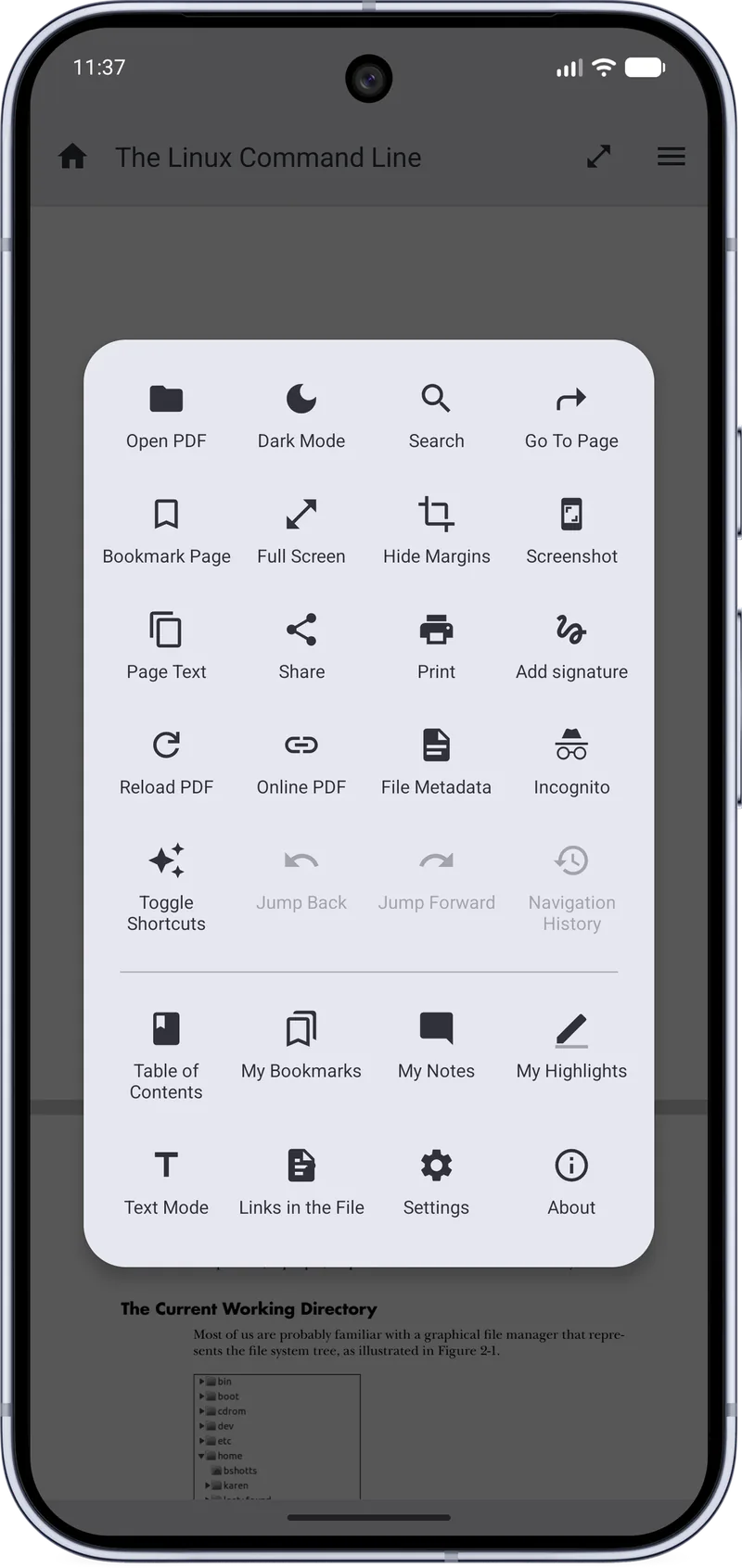
- Open the reader menuTap the menu icon in the top right corner.
- Choose Text ModeTap Text Mode in the menu to switch to the reflowed view.
- Adjust the reading experienceUse the reading settings for fonts and themes until the text feels right.
Tips
- Text Mode works best on text-heavy documents such as books and articles.
- Scanned documents without a text layer have nothing to reflow.
Related guides
How to Highlight PDF Text on Android
Step-by-step guide to selecting and highlighting text in a PDF on Android with MJ PDF 3.1.0, including color choices and quick actions.
How to Read PDFs in Dark Mode on Android
Turn on dark mode in MJ PDF 3.1.0 for comfortable night reading. The PDF page itself is darkened, not just the app interface.
Get MJ PDF 3.1.0
Free, open source and ad-free. Install from F-Droid or IzzyOnDroid, or read the source on GitLab.